
Automate Your ChatGPT Image Prompts
Prepare a queue, review it, and let the extension submit each prompt in order — waiting for every generation to finish and downloading the result before moving on.
Core Power
Key Features
Prompt Queue
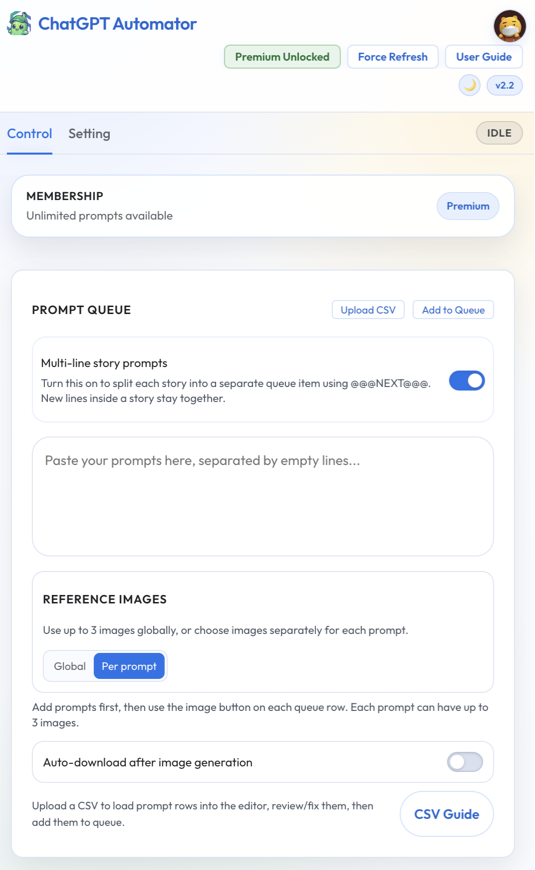
Build a queue of image prompts and let the extension submit them one at a time, in order.
CSV & Multi-line Import
Import prompt lists from CSV, or paste multi-line story prompts using the @@@NEXT@@@ delimiter.
Reference Images
Use global reference images across a whole queue, or attach up to 3 per prompt in Per-prompt mode.
Create-image Mode Lock
Keeps ChatGPT in Create image mode so every queued prompt actually generates an image.
Waits for Every Generation
Confirms each generation has finished before continuing — no half-finished results, no skipped prompts.
Auto-Download Results
Downloads each generated image automatically after completion, straight to your computer.
Storyboard Planning
Review prompts and their reference images side by side before you press Run.
Delay & Retry Controls
Configure the delay between prompts, track Open / Failed / Completed items, and reuse any prompt.
Workflow
How It Works
- Paste prompts or import a CSV file.
- Add the prompts to the queue.
- Choose Global or Per-prompt reference images.
- Review the queue or open Storyboard planning.
- Open ChatGPT and press Run.
- ChatGPT Automator submits one prompt at a time and waits for each result.
Flexible Options
Membership Tiers
Starter · Free Plan
Everything you need to try hands-free ChatGPT image generation.
- Google SSO or email login
- Prompt queue & CSV import
- Basic prompt automation
- 30 prompts per day
- Free Premium trial for eligible accounts
Premium
Unlimited daily automation with the full reference-image workflow.
- Everything in Starter, unlimited daily runs
- Global & Per-prompt reference images
- Up to 3 reference images per prompt
- Auto-download after generation
- Storyboard planning & dark mode
- Prompt delay controls
Got Questions?
Frequently Asked Questions
The extension automates the ChatGPT account you are already signed in to on chatgpt.com. Image generation limits follow your own ChatGPT plan; the extension does not bypass them.
No. Prompts and reference images stay in your browser and are exchanged directly with chatgpt.com when you run them. Our servers only handle sign-in, membership state, and daily usage counts. See the ChatGPT Automator Privacy Policy.
No — it is a separate extension purpose-built for ChatGPT, made by the same team. If you create in Google Flow, check out Google Flow Automator.
No. ChatGPT Automator is an independent product and is not affiliated with, endorsed by, or sponsored by OpenAI.