One script, every scene
Studio writes a single coherent narration across all your scenes and matches each line to the picture it describes — no re-describing, and your images are never uploaded to write it.
 Google Automator
 ▶
▶
▶ Watch the introduction, from the developer
Studio writes the plan, has Google Flow draw every picture, gives the script a voice, times the captions and scores the music — one guided flow from a blank project to a finished video. Everything runs on your own computer: your media, your API keys and the rendering never leave it. Stop and adjust anything, at every step.
Free for Pro members during the beta · Windows only. Read the full Studio guide →
A story is easy to imagine. Turning it into pictures, voice, captions and music is where the day goes.
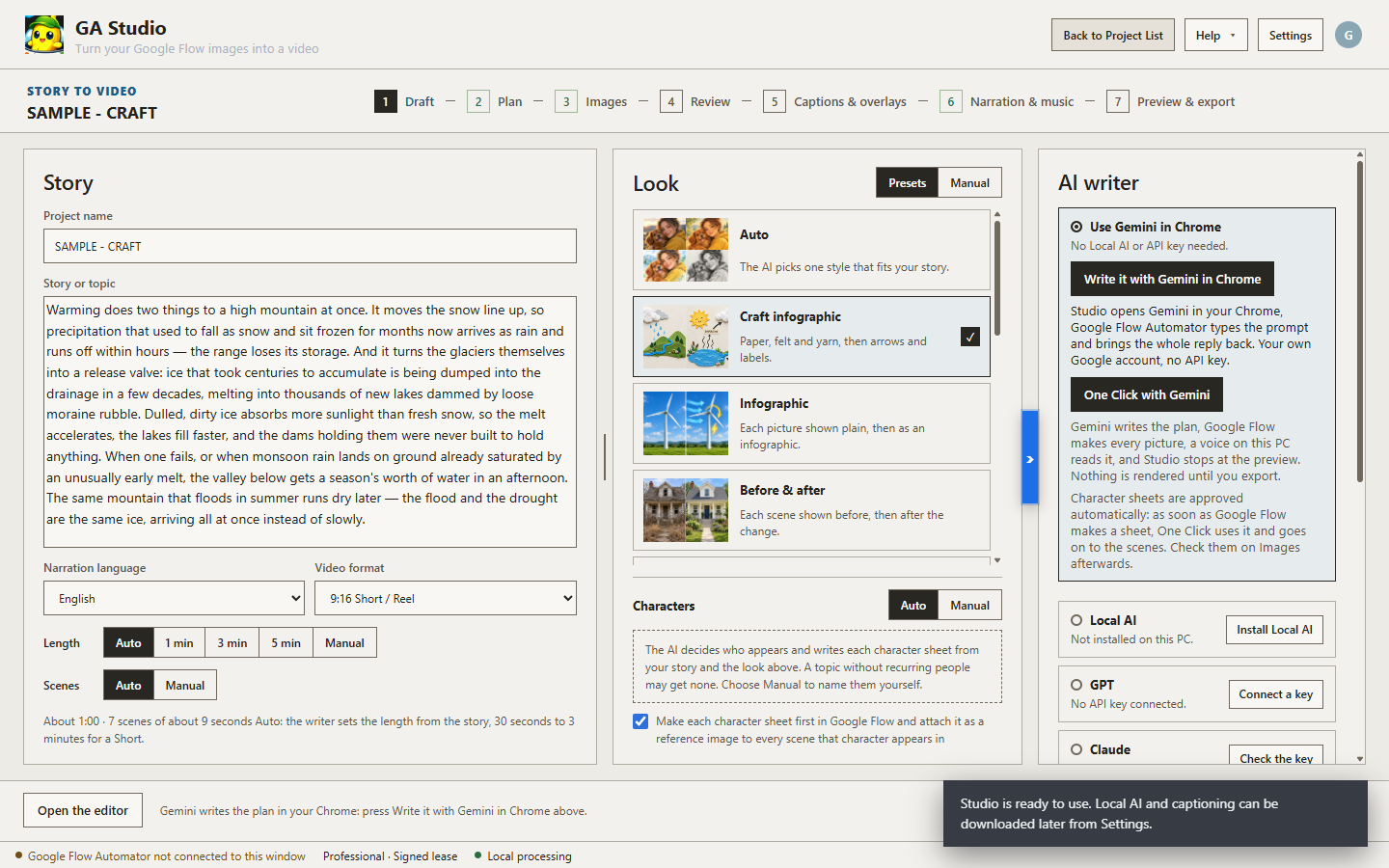
Describe what you want. Studio writes the plan, has Google Flow draw every picture, gives it a voice, times the captions and scores the music. You can stop and adjust anything, at every step.
Studio writes a single coherent narration across all your scenes and matches each line to the picture it describes — no re-describing, and your images are never uploaded to write it.
Zoom, pan, drift and reveal presets give stills real movement, and captions are cut to the narration automatically. Adjust any scene individually, or restyle every scene at once.
Use your own OpenAI or ElevenLabs key, run the local model, record directly, or upload your own narration.
Generate BGM locally that always covers the full project length. No monthly limits and no credit counter.
Click to seek, drag to select, trim from either edge, delete a section, undo. The original recording is never modified.
Images, recordings, project files and rendered videos stay in the local folder you choose. Rendering runs on your computer. Your API keys are stored by your operating system — not in the extension, and not in any database of ours.
We never receive your media or your AI keys. Network access happens only when you deliberately use a connected AI provider, and narration is written from your saved prompts, so your images are never uploaded to write a script.
Studio is included with a Pro membership during the beta, at no additional charge. Keep your Pro membership and Studio stays free for as long as you keep it — even after the beta ends and pricing may change for new members.
No Terminal, no developer tools, no manual extension setup. One guided installer puts everything Studio needs in place.
Distributed through the Microsoft Store.
The Microsoft Store verifies the publisher and signs every install and update automatically. Credentials are stored locally by your operating system, and the official Google Flow Automator extension connects automatically. macOS is not supported in this release.
Get it from Microsoft StoreAvailable now for Windows, to members with an active Pro membership. Studio checks your membership when you sign in from the extension.
Install and update Studio only through the Microsoft Store link above. Do not download it from third-party websites.
Better to know now than to find out after you've paid.
There is no macOS build yet. Apple charges a yearly developer fee just to list an app, and today only a small share of Google Flow Automator users are on a Mac — so we started on Windows and the free Microsoft Store. We'll revisit macOS as that changes.
Local narration, music and captions run on the CPU with 8 GB of RAM (16 GB recommended) and about 6 GB of free disk. No graphics card is needed — Google Flow draws the pictures and Gemini in Chrome writes the plan.
Some things are still rough and will change. Keep your own backups, check what it generates before you publish it, and tell us what breaks.
Pro membership only — but it will be available for Supporter members soon. Studio launches from the Google Flow Automator extension and checks your membership at start-up, so a Starter or Trial account cannot open it during the beta.
Windows PCs only. There is no macOS build. Studio also does real work on your hardware rather than on a server, so check the minimum specification before you install it — an underpowered machine is the single most common reason people have a bad first experience.
Ten. The choice covers the whole project — the interface, the narration and the captions all follow the language you pick, so the script is written and spoken in that language rather than translated afterwards.
English, 한국어 (Korean), 日本語 (Japanese), 中文 (Chinese), Español, Français, Deutsch, Português, हिन्दी (Hindi) and Italiano.
The rendered MP4; every scene clip as a separate file; narration audio per scene and as one continuous track; the background music track; captions as standard SRT; the original prompt for every scene as a CSV; and a manifest describing scene order, start times and durations.
Yes. Everything exports as standard media files plus SRT captions, which every major editor imports. The manifest and zero-padded file names keep hundreds of clips in the right order wherever you drop them.
File names are zero padded — scene_001, not scene_1 — so alphabetical sorting matches scene order in every tool. The manifest carries the exact timing if you need it.
No, and this is deliberate. Projects live in a local folder you choose, and the export is ordinary media files rather than a proprietary project format. There is nothing to trap you here.
You have two options. First, you can regenerate it — select a scene, change the narration text if you want, and click regenerate. If you're using a local AI model and it's not meeting your needs, you can switch to cloud narration: use your own OpenAI, Anthropic, or ElevenLabs API key and Studio will send the prompt directly to those services instead. Your keys stay in your OS credential store and are never stored by us.
Yes, completely. The Studio audio editor lets you click to seek, drag to select, trim from either edge, delete a section, and undo. The original recording is never modified — all edits are non-destructive. You can also delete the narration track entirely and record your own voice directly into Studio.
Local text-to-speech models are smaller than cloud services to keep file sizes reasonable on your machine. If you need more voices or higher quality narration, use a cloud provider: connect your own OpenAI, Anthropic, or ElevenLabs key through Studio. That will draw on their much larger model and voice collections. Be aware that using cloud services consumes your API tokens — check the pricing on those services to understand the cost per character narrated.
No. The local AI models work well for most cases and cost nothing beyond the initial download. Many users get excellent results without ever touching API keys. Try local first — if the quality meets your standard, you're done. Use cloud services only if you need more, not by default.
A Pro membership on the Google Flow Automator extension, signed in with the same account. Studio launches from the extension.
If you join while the beta is open, Studio stays included with your Pro membership for as long as you keep that membership — including after Studio becomes a separately paid product.
We haven't set the price yet, and we'd rather decide it after seeing how people actually use the beta than announce a number we might have to change. What we can commit to: if you join during the beta and keep your membership, it costs you nothing extra.
Your Studio access ends with your membership. If you rejoin later, whatever terms apply at that time will apply to you — the beta benefit isn't held open indefinitely.
No. A failed payment isn't treated as leaving. While the payment is being retried your access continues, and there's an additional grace period after the billing period ends. The benefit is tied to cancelling, not to a bank hiccup.
Your membership pays for the extension; Studio is a benefit included during the beta rather than a separate purchase, so we don't offer refunds on the basis of Studio. You can cancel your membership at any time, and if something has genuinely gone wrong, talk to us on the support page — we'd rather sort it out than argue about it.
We don't have a fixed date yet. We'll announce it at least 30 days in advance so nobody is caught out.
Studio makes a full video on your PC with local narration (Local TTS), local background music (Local BGM) and captions. No graphics card is required — Google Flow draws the pictures and Gemini in Chrome writes the plan. Meeting only the minimum means it will work, not that it will be quick.
GA Studio with Local TTS & Local BGM
| Component | Minimum | Recommended |
|---|---|---|
| OS | Windows 10 64-bitversion 2004 / build 19041 | Windows 11 64-bit |
| Processor | 4 threadsIntel Core i3-8100 · AMD Ryzen 3 2200G | 8 threads or moreIntel Core i5-12400 · AMD Ryzen 5 5600 |
| Memory | 8 GB RAM | 16 GB RAM |
| Graphics | Not required | Optional: NVIDIA GPU with 4 GB+speeds up Local TTS · Asian |
| Storage | 6 GB available space | 12 GB available space (SSD) |
| Additional | Chrome with the Google Flow Automator extension | |
No. Local narration, music and captions run on the CPU, Google Flow draws the pictures, and Gemini in Chrome writes the plan in your browser. Nothing in this release needs a graphics card.
Not yet. Local AI is built and works, but Microsoft Store policy does not currently allow us to distribute it with the app, so it is switched off in this release. Gemini in Chrome writes the plan instead — free, no API key, no graphics card. We will announce it here the moment Local AI becomes available.
Yes. If you already have an OpenAI, Anthropic or ElevenLabs key you can connect it and Studio will call those services directly, which is faster and needs nothing from your GPU. Keys are kept in your operating system's credential store and never sent to our servers.
Be aware that this spends your own tokens. Every narration or script request is billed to your account by that provider, so check their pricing before you run a large project. Gemini in Chrome and the local services remain free — an API key is a convenience, never a requirement.
Yes. Studio is distributed through the Microsoft Store, which verifies the publisher and signs every install and update automatically. You will see the publisher named in the Store listing rather than an "unknown publisher" warning.
Get it only from the Microsoft Store link on this page. Copies from third-party download sites are not covered by that guarantee.
No, not yet. This release is Windows 10 and Windows 11 only. Two things drove that: shipping on the Mac App Store means paying Apple's annual developer fee, and looking at our current Google Flow Automator users, very few are on a Mac today. We'd rather start where the users are and revisit macOS later, once that changes.
About 6 GB for local narration, music and captions, and 12 GB on an SSD with both voice engines installed.
The installer bundles everything Studio needs to run on its own — the desktop app, the local narration and background-music engines, and every other required package — so the initial install is bigger than a typical app. That size does not include Local AI, which is not part of this release.
To generate the media in the first place, yes — Studio works with what Flow produces, and Flow's own limits apply to generation. Studio itself doesn't consume Flow credits.
Not to us. Selected media is copied into your local project folder and rendering happens on your machine. Narration is written from your saved prompts, so the images themselves aren't sent to an AI provider to write the script either.
In your operating system's credential store. They are never sent to our servers.
Yes. Local narration, local captioning and local background music run entirely on your computer once installed. Cloud voices need a connection, and the extension checks your membership periodically.
It's a beta and we're not going to pretend otherwise. Core workflow is solid; some rendering and import edge cases are still being fixed, and details will change between builds. Keep backups of anything you care about and check output before publishing.
Yes, please do. Studio has a feedback and feature request form built in — open Help inside the application and submit it from there. Tell us what you actually want, in your own words.
Every request gets read. If it is something that can be built, it gets added — beta requests are what shape the release version.
Join while the beta is open and Studio stays included with your membership. Install once, send your clips from the extension, and get a finished video plus every asset behind it.